

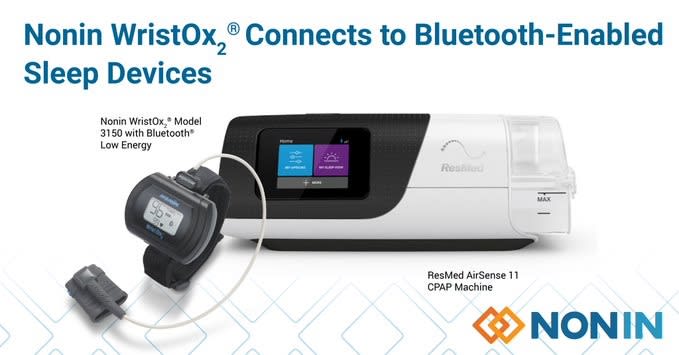
How to Connect and Use the Nonin 3150 BLE WristOx2 with ResMed AirSense 11: A Step-by-Step Guide
Enhance your sleep apnea therapy by integrating the Nonin 3150 BLE WristOx2 Pulse Oximeter with the ResMed AirSense 11 CPAP machine. This comprehensive guide provides clear instructions for seamless connection and use, optimized for users and healthcare providers. Available at TurnerMedical.com.
Why Use the Nonin 3150 BLE with ResMed AirSense 11?
The Nonin 3150 BLE WristOx2 is a wrist-worn pulse oximeter with Bluetooth Low Energy (BLE) technology, designed for accurate monitoring of oxygen saturation (SpO2) and heart rate. When paired with the ResMed AirSense 11, it offers:
- Real-time oxygen and pulse rate monitoring during sleep therapy.
- Insights into CPAP therapy effectiveness.
- Data sharing with healthcare providers via AirView™ or myAir™.
- Nonin’s PureSAT® technology for precise readings in low perfusion or motion conditions.
This integration is ideal for sleep labs, homecare, or personal use, making it a powerful tool for managing obstructive sleep apnea (OSA).
Keywords: Nonin 3150 BLE, ResMed AirSense 11, pulse oximeter, CPAP therapy, sleep apnea monitoring, Turner Medical.
What You’ll Need
Before starting, gather the following:
- Nonin 3150 BLE WristOx2 Pulse Oximeter (available at TurnerMedical.com).
- ResMed AirSense 11 CPAP or APAP machine.
- Nonin PureLight® Sensor (e.g., 8000SM adult medium soft finger sensor, included or purchased separately).
- Two AAA batteries (for the Nonin 3150 BLE; provides 48 hours without Bluetooth, 24 hours with Bluetooth active).
- myAir App (optional, for therapy tracking on iOS/Android).
- nVISION Software (optional, for advanced data analysis via USB or Bluetooth on a computer).
Step-by-Step Guide to Connecting Nonin 3150 BLE to ResMed AirSense 11
Follow these detailed instructions to pair and use your devices effectively.
Step 1: Prepare the Nonin 3150 BLE Pulse Oximeter
- Insert Batteries:
- Open the battery compartment on the Nonin 3150 BLE.
- Insert two AAA batteries, ensuring correct polarity.
- Close the compartment securely.
- Attach the Sensor:
- Connect a compatible Nonin PureLight® sensor (e.g., 8000SM) to the device’s sensor port.
- Place the sensor on your finger (or as directed for pediatric use).
- Power On the Device:
- Press the power button on the Nonin 3150 BLE.
- Verify the display shows SpO2 and pulse rate readings.
- Enable Bluetooth:
- Ensure the Bluetooth icon appears on the display, indicating pairing mode.
Tip: The Nonin 3150 BLE has a 1,080-hour memory capacity, perfect for overnight sleep studies, with wireless data transfer to compatible apps or software.
Step 2: Set Up the ResMed AirSense 11
- Power On the AirSense 11:
- Plug the power cord into the back of the AirSense 11 and connect to a power outlet.
- Press the on/off button to power on.
- Ensure the device is on the Patient Start Screen with cellular network bars visible.
- Access Pulse Oximeter Settings:
- Navigate to the Settings menu using the touchscreen.
- Select Search for Pulse Oximeter to initiate Bluetooth pairing.
Note: The AirSense 11 must be activated with AirView™ or myAir™ and not in sleep mode for pairing.
Step 3: Pair the Nonin 3150 BLE with the AirSense 11
- Initiate Pairing:
- On the AirSense 11, select Search for Pulse Oximeter.
- The AirSense 11 will scan for nearby Bluetooth devices.
- Select the Nonin 3150 BLE:
- When the Nonin 3150 BLE appears in the list, select it.
- Follow any on-screen prompts to confirm pairing.
- A 4-digit key may appear; enter it on the Nonin 3150 BLE if prompted (refer to the user manual).
- Confirm Connection:
- The AirSense 11 will display a confirmation message.
- The Nonin 3150 BLE will show a solid Bluetooth icon.
Pro Tip: If pairing fails, ensure the Nonin 3150 BLE is within 10 meters of the AirSense 11, restart both devices, and retry.
Step 4: Use the Nonin 3150 BLE During CPAP Therapy
- Wear the Oximeter:
- Secure the Nonin 3150 BLE on your wrist like a watch.
- Place the finger sensor comfortably on your finger, ensuring it’s snug but not tight.
- Start CPAP Therapy:
- Begin AirSense 11 therapy by pressing the start button.
- The Nonin 3150 BLE will monitor SpO2 and pulse rate, transmitting data to the AirSense 11.
- Monitor Data:
- The AirSense 11 stores oximetry data, accessible via the myAir app or shared through AirView.
- For advanced analysis, download data from the Nonin 3150 BLE to nVISION software using USB or Bluetooth.
SEO Keywords: Nonin 3150 BLE setup, ResMed AirSense 11 pulse oximeter pairing, sleep study monitoring, CPAP oxygen tracking.
Step 5: Disconnect or Reconnect to a New AirSense 11 (Optional)
- Disconnect:
- On the AirSense 11, go to Settings > Pulse Oximeter > Disconnect.
- Alternatively, turn off Bluetooth on the Nonin 3150 BLE or power it down.
- Reconnect to a New Device:
- Follow Steps 1–3 to pair the Nonin 3150 BLE with a new AirSense 11.
- Ensure the oximeter is in pairing mode and the AirSense 11 is searching for devices.
Tips for Optimal Use and Maintenance
- Battery Life: Replace AAA batteries every 24–48 hours, depending on Bluetooth usage, to ensure uninterrupted monitoring with the Nonin 3150 BLE.
- Sensor Care: Clean the Nonin PureLight® sensor with a soft cloth and mild disinfectant after each use to maintain accuracy.
- Data Storage: The Nonin 3150 BLE’s 1,080-hour memory supports extended monitoring; transfer data regularly to avoid overwriting.
- Comfort: Adjust the wristband for a secure yet comfortable fit to prevent movement during sleep.
Shop the Nonin 3150 BLE at Turner Medical
Ready to enhance your sleep therapy? Purchase the Nonin 3150 BLE WristOx2 Pulse Oximeter today at TurnerMedical.com. For additional support, contact our team or consult your healthcare provider to optimize your CPAP therapy with ResMed AirSense 11.